AI Website Builder Guide
Build a professional lawn-care business website in about 60 seconds with Lawnager AI website builder — it writes your headlines, about text, and service pages.
Last updated July 9, 2026

AI Website Builder
Every Lawnager plan includes a free AI-generated business website.
Creating your website
- •Go to My Website in the sidebar
- •Enter your business details (name, services, service area)
- •Click Generate with AI — the system writes your headlines, about text, and FAQ
- •Customize colors, sections, and content
- •Click Publish
Your site is live at yourbusiness.lawnager.com.
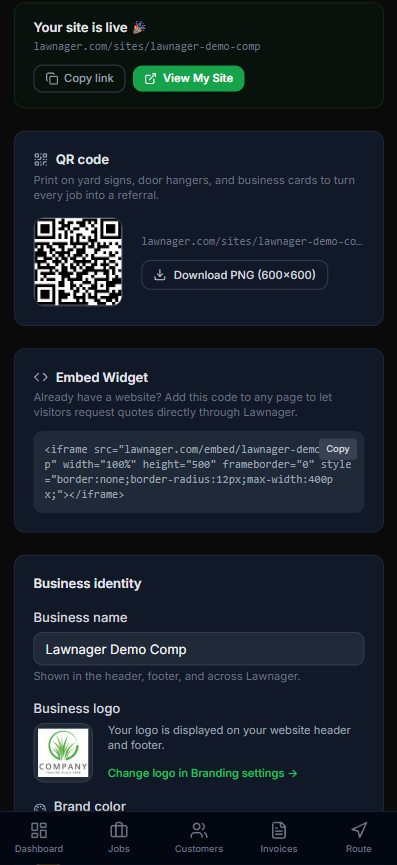
The My Website dashboard gives you everything to drive prospects to your site: a printable QR code for yard signs and door hangers, a copy-paste embed widget for any existing website you have, and quick edits for your business name, logo, and brand color.
Website features
Your generated site includes:
- •Hero section with headline and call-to-action
- •Services listing pulled from your service catalog
- •Instant estimate calculator by lot size
- •Customer reviews pulled from your portal reviews
- •Before/after photo slider (upload your best work)
- •FAQ section (AI-generated or custom)
- •ZIP code service area checker
- •Lead capture form for new client inquiries
- •Seasonal promotion banner with expiration dates
- •QR code for yard signs and business cards
Custom domain (Growth+ plans)
On Growth and Pro plans, you can point your own domain (e.g., www.yourlawncompany.com) to your Lawnager site:
- •Go to My Website > Domain
- •Enter your custom domain
- •Add the CNAME record shown to your DNS provider
- •Wait 1-24 hours for DNS propagation
Updating content
Changes are saved as drafts. Click Publish to push updates live. You can preview changes before publishing.
No other lawn care software includes a free business website. This feature alone can save you $50-100/month vs. a separate website builder.
Your website answers questions for you — the AI chat assistant
Every published Lawnager website includes a built-in chat assistant (all plans, English and Spanish). Visitors can ask about your services, starting prices, hours, and service area — and it answers using only your own business information. It never invents prices or discounts; anything it can't answer, it points to a quote request or your phone number.
When a visitor is ready to buy, the assistant can take their quote request right in the chat — name, email, and service address — and it lands in your pipeline like any other website lead, with a notification to you.
Turning it on or off: it's on by default for published sites. Go to Settings → Website and use the “AI chat assistant” checkbox in the display options.
Related articles
Still have questions?
Contact support →