How to Use AI Quoting
Generate professional quotes in seconds using AI-powered estimates based on property data.
Last updated May 8, 2026

AI-Powered Quoting
Lawnager's AI quoting generates accurate, professional quotes using property data and your pricing history.
Creating an AI quote
- •Go to Quotes and click + New Quote
- •Select or add the customer
- •Choose the services you want to quote
- •Click Generate with AI — the system will fill in line items, quantities, and pricing based on the property and your catalog
- •Review and adjust as needed
- •Click Send to Client
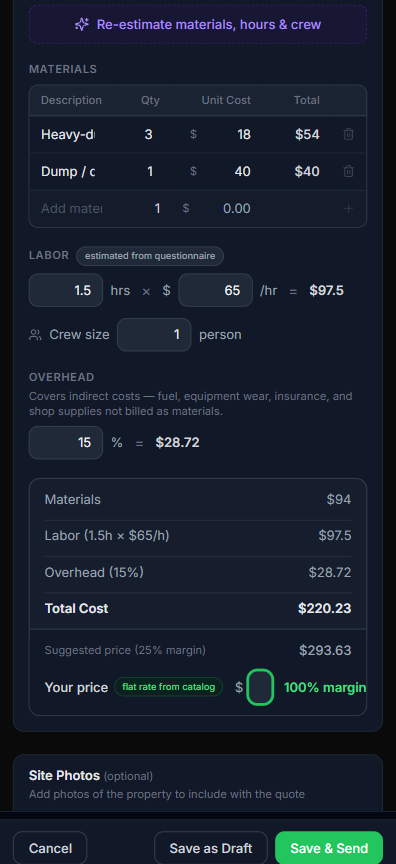
The purple Re-estimate materials, hours & crew button at the top runs the AI estimator. Lawnager fills in your materials list with quantities and unit costs, sets labor hours and crew size based on the questionnaire you completed, and calculates overhead — then surfaces a suggested price based on your margin target. You stay in control: edit any line, override the price, or save as a draft.
How pricing is calculated
The AI considers:
- •Property size from satellite data
- •Service type and your catalog pricing
- •Historical job data from similar properties you have serviced
- •Your margin targets set in Settings
Add-on services vs. supplies
A quote has two kinds of extra line items, and keeping them in the right list matters for your numbers:
- •Supplies (the materials list) are costs — mulch, fertilizer, stone. They're what the job costs you, and the AI price builds your margin on top of them.
- •Add-ons are extra services you sell — an added hedge trim, a gutter clean. They're revenue with margin, not cost.
Put an add-on service in the supplies list and the math treats your revenue as a cost — your suggested price and margin both come out wrong. Use the Add-ons section for services, the supplies list for things you buy.
Know when they open it
The first time a customer views their quote in the portal, you get a push notification and email — that's your "they're looking at it right now" signal, and the best moment for a friendly follow-up call.
Deposit collection
You can require a deposit on any quote. Set the deposit percentage in the quote editor (default: 25%). When the client accepts, they pay the deposit through your branded portal.
Automated follow-ups
If a client has not responded within 48 hours, Lawnager can automatically send a follow-up reminder. Enable this in Settings > Notifications.
Tip: The more jobs you complete, the more accurate AI quotes become — the system learns from your actual costs and durations.
Related articles
Still have questions?
Contact support →