Route Optimization Guide
Optimize daily lawn-care routes with Lawnager VROOM engine to cut drive time and fuel costs. Set vehicles, crews, and hours to order every stop efficiently.
Last updated June 20, 2026

Route Optimization
Lawnager uses the VROOM optimization engine to calculate the most efficient order for your daily stops.
Building an optimized route
- •Go to the Route page
- •Select the date(s) you want to optimize
- •Set your vehicle count and crew assignments
- •Configure working hours and lunch breaks
- •Click Build Schedule
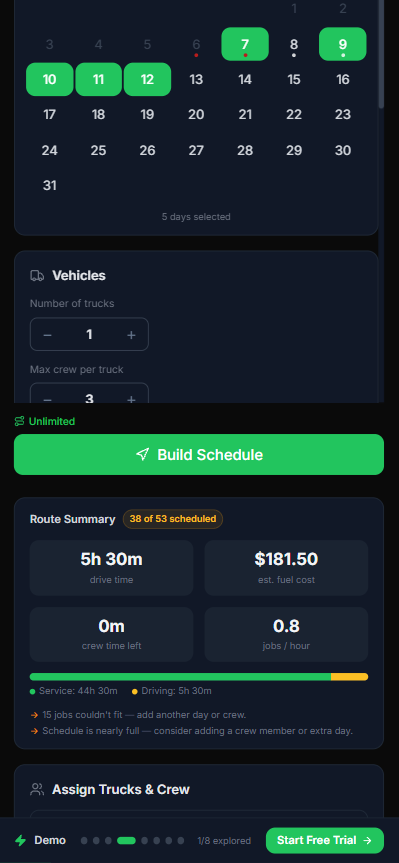
As you select days and configure crews, the Route Summary updates in real time with drive time, estimated fuel cost, jobs-per-hour, and capacity warnings — so you can see whether your day actually fits before you commit to a schedule.
The system calculates the optimal stop order considering:
- •Drive time between stops
- •Job duration at each property
- •Crew skills and availability
- •Equipment requirements
- •Time windows (if clients have preferred times)
Applying the route
After reviewing the optimized schedule, click Apply Schedule to push it to your crew. They will see their route on their mobile device.
Daily route view
Each crew member sees:
- •Stop-by-stop list with addresses and arrival times
- •Turn-by-turn navigation (opens in Google Maps)
- •Job details and checklists at each stop
- •Check-in / check-out buttons for time tracking
Truck load lists
The system automatically generates a load list for each truck showing what equipment and materials are needed for that day's stops.
Pro tip: Operators who use route optimization consistently report 20-30% reduction in daily mileage and 3+ hours saved per week.
Related articles
Still have questions?
Contact support →